Posts

Quick Tips Before Buying Laptop(Laptop မဝယ်ခင်စဉ်းစားရမယ်အချက်များ)

Image
     Laptop တစ်လုံးဝယ်တော့မယ်ဆိုရင် အရင်ဆုံးဘာတွေစဉ်းစားသင့်လဲ။ဘယ်လို software တွေသုံးမှာလဲ။ဘယ်လောက် ဈေးနှုန်းနဲ့လဲ။Performance ဘယ်လောက်လိုချင်တာလဲ။ အခုပြောပြမှာကတော့ Laptop မဝယ်ခင်စဉ်းစားလို့ရနိုင်မယ်အချက်လေးတွေပါ 1. Pick a Platform: Mac, Windows OS? အဲတာကဘာလဲဆိုတော့ ကိုယ် Laptop မှာတင်မဲ့ OS(Operating System) ကိုပြောတာ။များသောအားဖြင်တော့ Window တွေပဲသုံးတာများကြတယ်။အဲ့တာကuser တွေနဲ့ ပိုပြီး Familiar ပိုဖြစ်တယ်။Linux ကတော့ IT ပိုင်းတွေလောက်ပဲသုံးကြတာ။ MacOS ကတော့ Mac Book ဝယ်သုံးရင်တစ်ခါတည်းပါပြီးသား။ 2. Decide If You Want a 2-in-1 အခုနောက်ပိုင်းမှာ laptop တွေက 2-in-1s တွေဖြစ်လာပါပြီ။ 2-in-1s ကဘာလဲဆိုတော့ Laptop က  tablet လိုပုံစံမျိုးပါသုံးလို့ရတာကိုပြောတာ။ Screen ကိုနောက်ဘက်ကို 360 degrees လှည့်လို့ရတာမျိုးကိုပြောတာ။ အခုနောက်ပိုင်း Window 10 မှာ Tablet mode အနေနဲ့ သုံးရင်အဆင်ပြေစေမယ် Features တွေထည့်ပေးထားတာတွေ့ရတယ်။ 3. Choose the Right Size Screen  size ကတော့ကိုယ်ရဲ့လိုအပ်မှုနဲ့ဆိုင်ပါတယ်။ကိုယ်က Game ဆော့မှာတို့ Design ဆွဲမှာတို့ Au...
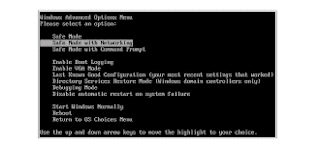
10 Easy steps to clean your infected computer firstly (Virus ရှင်းခြင်း)

Image
 ကျွန်တော်တို့ဒီနေ့ပြောမှာကတော့ ကိုယ့် computer ကို Virus ကိုက်ပြီဆိုရင် အရင်ဆုံးလုပ်သင့် တာလေးတွေအကြောင်းပြောမှာပါ ။ကိုယ်ရဲ့ computer ထဲကို Login ဝင်လိုက်တဲ့အချိန်မှာ အရမ်းကြာနေတာမျိုးတွေဖြစ်တက်ပါတယ်။computer က အရမ်းလေးနေတာမျိုးတွေ  ၊ ကိုယ်ရဲ့ desktop screen မှာလည်း unfamiliar ဖြစ်တဲ့ applications တွေတွေ့နေရတာမျိုးဖြစ်တက်ပါတယ်။နောက်တစ်ခုက သင့် ရဲ့firefox or chrome တို့လို web browser တွေမှာမလိုလားအပ်တဲ့ AD (ကြော်ငြာ)တွေတက်တက်လာတာမျိုးတွေဖြစ်ဖူးကြပါလိမ့်မယ်။ အဲ့လိုဖြစ်လာရင်အရင်ဆုံးဘာတွေလုပ်သင့်သလဲ။အောက်ပါအချက်လေးတွေနဲ့ဖြေရှင်းကြည့်ရအောင် Step 1. Computer acting suspect? Do a little digging and check for symptoms. Characteristic of a malware infection တွေကို ရှာဖွေပါ။ဘယ်လိုရှာရမလဲဆိုတော့ -ကိုယ်ရဲ့ web browser က freeze  or  unresponsive ဖြစ်နေလား? -web pages ခေါ်တဲ့အချိန်မှာ redirected တွေကပုံမှန်ထက်အရမ်းများနေလား? -pop-up messages တွေအဆက်မပျက်တက်လာနေလား? -Computer ကပုံမှန်ထက်နှေးနေလား? -သင်မသိတဲ့ software icon တွေ သင့် desktop မှာတွေနေရလား? အထက်ပါအချက်တွ...

Cannot click anything on new Google login screen

Image
က်ြန္ေတာ္တို႔ဒီေန႔ေျပာျပမွာကေတာ႔ Gmail ကို computer ေပၚမွာရွိတဲ႔ Chrome မွာ၀င္သံုးတဲ႔အခ်ိန္မွာ Chrome ေပၚမွာရွိတဲ႔ Google Login screen က အလုပ္မလုပ္တာကို(Not responding) ျဖစ္ေနတာကိုေျဖရွင္းတဲ႔နည္းျဖစ္ပါတယ္ Gmail, Google Drive ေတြစတဲ႔ Google Products ေတြကို Chrome မွာ ၀င္သံုးတဲ႔အခ်ိန္မွာေအာက္ပါပံုနဲ႔ေတြရလိမ္႔မယ္ အဲအခ်ိန္မွာ gmail address ကိုရိုက္ျပီး Next သြားလိုက္တဲ႔အခ်ိန္မွာ Google Login screen က အလုပ္မလုပ္ေတာ႔ဘူး။ Internet ကိုစစ္ႀကည္႔လိုက္ေတာ႔ Internet က လည္းFine တျခား website ေတြလည္းေကာင္းေကာင္းေခၚလို႔ရတယ္။window update ပတ္သက္ျပီးျဖစ္တက္တဲ႔ Error မိ်ဳးပါ အဲ႔တာကို အရွင္းေျပလည္ေအာင္လုပ္ခ်င္ရင္ေတာ႔ Window ျပန္တ င္တာမ်ိဳးေတြလုပ္မွရမယ္။အခုက Window ျပန္တင္ဖို႔အဆင္မေျပတဲ႔အခ်ိန္ Urgent သံုးဖို႔နည္းလမ္းေလးပါ။ တစ္ခ်က္ေလာက္လုပ္ႀကည္႔ရေအာင္ Chrome ရဲ႕ Setting ကိုသြားပါ Advanced ကို ႏွိပ္ပါ Privacy and security ေအာက္ကိုသြားပါ။ Content Setting ကိုႏွိပ္လိုက္ပါ အဲ႔ေအာက္မွာမွ JavaScript ႏွိပ္လိုက္ပါ အဲ႔ ေနရာမွာ Default  က Allowedကိုေ...