Posts

Computer Password Recovery

Image
Passwords ဖြင့္နည္းသိခ်င္သူေတြအတြက္နညး္လမး္ေလးမ်ား Way(1) ကြန္ပ်ဴတာစသံုးတဲ့အခါ သို႕မဟုတ္ ၀င္းဒိုးတင္တဲ့အခါေတြမွာ Username မျဖစ္မေနေပးခဲ့ရပါတယ္။ ထိုအခါ ကြန္ပ်ဴတာမွာ Username နဲ႕ Administrator ဆိုၿပီးအေကာင့္ႏွစ္ခုျဖစ္သြားပါတယ္။ ဥပမာ Username မွာ MgMg လို႕ေပးခဲ့ရင္ MgMg နဲ႕အတူ Administratorဆိုတဲ့အေကာင့္က ပူးတြဲပါရွိလာပါတယ္။ မိတ္ေဆြက MgMg မွာ passwords ေပးထားခဲ့တယ္ ဒါေပမယ့္ ေမ့သြားၿပီဆိုလွ်င္ ကြန္ပ်ဴတာကို Restart ခ်လိုက္ပါ။ Restart ခ်လိုက္တာနဲ႕တျပိဳင္နက္ F8 ဆိုတဲ့ Key ကိုအဆက္မျပတ္ႏွိပ္ေပးထားပါ။ ႏွိပ္ပါဟုဆိုရာတြင္ ဖိထားခိုင္းျခင္းမဟုတ္ပါ။ ထိုအခါ Safe Mode ျမင္ကြင္းကိုေရာက္ရွိသြားပါမယ္။ Safe Mode ဆိုတဲ့စာသားေနရာကုိ Arrow Key နဲ႕ေရႊ႕ၿပီး Enter ေခါက္လိုက္ပါ။ အခ်ိန္အနည္းငယ္ေတာ့ေစာင့္ရပါမယ္။ ထိုအခါ ကြန္ပ်ဴတာသည္ Safe Mode ျမင္ကြင္းနဲ႕ပြင့္လာပါလိမ့္မယ္။၄င္းတြင္ Administrator ႏွင့္Username ( MgMg) ကိုေတြ႕ရပါမယ္။ Username ( MgMg) သည္ passwords ေမ့ေနသူရဲ႕အေကာင့္ပါ။ယခု Administrator အေကာင့္ကိုဖြင့္လိုက္ပါ၊ Safe Mode နဲ႕၀င္ထားတာျဖစ္တဲ့အတြက္ MgMg အေကာင့္ကိုေတာ့၀င္လုိ႕ရမည္မဟုတ္ပ...

Protocol

Image
                                      Protocol ဆိုတာကေတာ႔ File Type, OS ေတြနဲ႔Communication Devices ေတြကိုခ်ိတ္ဆက္ရာမွာအသံုး ျပဳတဲ႔ Language တစ္မ်ိဳးျဖစ္တယ္။ Protocol ေတြကိုထပ္ခြဲလိုက္ရင္ေတာ႔ 1.TCP/IP (Transport Control Protocol/Internet Protocol) 2.SMTP (Simple Mail Transport Protocol) 3.POP (Post Office Protocol) 4.ICMP (Internet Control Message Protocol) 5.HTTP (Hyper Text Transport Protocol) 6.PPP (Point to Point Protocol) 7.NETBIOS (Network Basic Input/Output System) 8.NetBEUI (NETBIOS Extended User Interface) 9.ARP (Address Resolution Protocol) 10.BGP (Border Gateway Protocol)  11.Telnet (Terminal Networking Protocol) 12.FTP (File Transfer Protocol) 13. SSH  (Secure Shell) 14. SMB  (Server Message Block) 15. HTTPs   Secure Hyper Text Transfer Protocol 16. IMAP   Internet Message Access Protocol 17. NTP   ...

Distance vector and link state Routing Protocol

Image
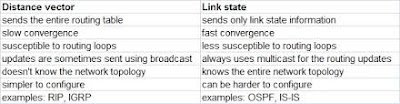
Two major classes of routing protocol ေတြကေတာ႔ distance vector and link-state ပဲျဖစ္ပါတယ္။Distance Vector" and "Link State" ေတြကို networks ေတြႀကားမွာroutersေတြက  packets ေတြကို    forwardလုပ္တဲ႔ေနရာမွာသံုးတဲ႔    routing protocols ေတြကို describe လုပ္ဖို႔သံုးတယ္။  အခ်ိဳ႔  routing protocol ေတြရဲ႔ ရည္ရြယ္ခ်က္က a destinationေရာက္ဖို႔႔၊ all network paths ေတြမွ a destination networkကိုေရာက္ဖို႔ the best path ကိုေရြးဖို႔ သံုးတဲ႔  all network paths ေတြအားလံုးရဲ႕  informationေတြကို   dynamically communicate လုပ္ဖို ႔ျဖစ္တယ္။ The terms distance vector and link state   ေတြကို    a distance metric (the distance) and an interface (the vector)ေပၚမွာအေျခခံျပီးthe best routing pathေတြေရြးတဲ႔the routing protocolေပၚမွာမွ ထက္ျပီး အေျခခံတဲ႔two broad categories ထဲမွာrouting protocols ေတြကို group လုပ္ဖို႔ ၊ the state of each link in a pathကို calculating လုပ္ျခင္းျဖင္႔႔ ႏွင္႔ the ...

Subnetting

Image
A  subnetwork , or   subnet   ဆိုတာက IP network  ရဲ႔  logical, visible subdivision ျဖစ္တယ္။ႏွစ္ခု(သို႔)ႏွစ္ခုထက္ပိုေသာ  networks သို႔  a network တစ္ခုကိုခဲြျခမ္းျခင္းကို  subnetting လို႔ေခၚပါတယ္။ Each IP class ေတြကို  prefixed number of Networks and prefixed number of Hosts per networkရွိတဲ႔  အဲ႔  IP class ေတြနဲ႔  bounds လုပ္ထားတဲ႔ သူရဲ႔ ကိုယ္ပိုင္  default subnet mask နဲ႔ ျဖည္႔စြက္တပ္ဆင္ထားတယ္။ Classful IP addressingက  number of Hosts per Network or more Networks per IP Class ျဖစ္မွူကို  flexibility ျဖစ္ေအာင္ ေထာက္ပံ႔မေပးပါဘူး။ CIDR or   Classless Inter Domain Routing ကေတာ႔  Subnetသံုးျပီးေ ထာက္ပံ႔ေပးနိုင္ပါတယ္။ subnetting သံုးျခင္းျဖင္႔ one single Class A IP address ကို better network management capabilities အျပည္႔နဲ႔ smaller sub-networks ရဖို႔ သံုးနိုင္တယ္။ Class A Subnets Class Aမွာthe first octet ကိုသာ Network identifier and rest of three octets...

Static Routing Protocol

Image
Static routing ဆိုတာ router တစ္ခုမွာ routing entryေတြကို  manually-configured  လုပ္ရတဲ႔  routing protocol တစ္ခုျဖစ္ပါတယ္။ static routes  ေတြကို network administrator ေတြက  adding in entries into a routing table လုပ္ျခင္းျဖင္႔ configured လုပ္ႀကတယ္။ dynamic routing ေတြနဲ႔မတူတာက static routes ေတြကို network ကို changed လုပ္လည္း  change မျဖစ္ဘူး၊ reconfigured လုပ္မွ change တယ္။static routing ႏွင္႔dynamic routing ကႏွစ္ဦးႏွစ္ဖက္သီးသန္႔မဟုတ္ပါဘူး။ Both dynamic routing and static routing ေတြကို router တစ္ခုေပၚမွာ  routing efficiency ေတြကိုျမွင္႔ဖို႔နဲ႔  dynamic routing information ေတြ  exchanged လုပ္ဖို႔  failsျဖစ္တဲ႔အခ်ိန္မွာ  backups ေတြကို provideလုပ္ဖို႔ သံုးတယ္။ Static routingေတြကို  stub networks ေတြမွာ နဲ႔  a gateway of last resortကို  provideဖို႔သံုးတယ္။ Static routing may have the following uses: Static routing ေတြကို  other routesေတြကိုမလိုတဲ႔အခ်ိန္မွာ an exi...

Routed And Routing Protocol

Image
A routed protocol ဆိုတာ data  ေတြကို routed ေပးနိုင္တဲ႔ protocol တစ္ခုျဖစ္တယ္။ Routed protocol ေတြကေတာ႔ IP, AppleTalk, and IPX ေတြပါ၊အဲ႔ဒီ protocol ေတြမွာ an addressing scheme and subnetting ရွိဖို႔လိုတယ္။  Addressing scheme ကို ဘယ္ host ေတြကို ဘယ္ network မွာရွိေနမွာကိုဆံုးျဖတ္ဖို႔နဲ႔  particular networkေပၚမွာ host ေတြကို   identifying လုပ္ဖို႔သံုးပါတယ္။ All hosts on an internetwork ေတြက  the services of a routed protocol  ေတြကိုသံုးေနၿကတယ္။ ဒါက router မ်ား, server, workstations ကိုဆိုလိုသည္။ IP and IPX ေတြဟာယေန႔ခတ္မွာအသံုးမ်ားတဲ႔ protocol မ်ားျဖစ္တယ္။ဒါေပမယ္႔ IPX ကို cisco exam မွ ျဖဳတ္လိုက္ျပီးယေန႔ေခတ္ သိပ္မသံုးေတာ႔ပါဘူး။ IP routed protocol တစ္ခုပဲ အာရံုစိုက္ဖို႔လိုပါတယ္။ A routing protocol ကကြဲျကားပါတယ္။ Router ႏွစ္ခုႀကားမွာပဲသံုးတယ္။အဲ႔တာက  routing tables ေတြကို build and  maintain လုပ္ေပးတယ္။  three classes of routing protocols ေတြက 1)distance vector, 2)link state,3)hybrid ေတြပဲျ...

Fixing IP address already assigned to another adapter error in VMware

Image
VM virtual network adapter ကို upgrade လုပ္လိုက္လို႔ျဖစ္ေစ သို႔မဟုတ္ VM migrate လုပ္တဲ့အခါ Version အေဟာင္းကေန အသစ္ကို ေျပာင္းတဲ့အခ်ိန္ျဖစ္ေစ Network adapter ေတြကို ႀကိမ္ဖန္မ်ားစြာ Add, Remove လုပ္လို႔ျဖစ္ေစ Phisical Machine ကေန Virutal Machine ကို ေျပာင္းတဲ့အခါျဖစ္ေစ ေအာက္က Error မ်ိဳး ၾကဳံေတြ႕ရနိုင္ ႀကံဳေတြ႕ရတတ္ပါတယ္။ တကယ္ေတာ့ ဒီ Error မ်ိဳးက ghosted network adapter လို႔ေခၚတဲ့ device manager မွာ hidden ျဖစ္ေနတဲ့ network adapter ေၾကာင့္ျဖစ္ေနတာပါ။ Device Manager ကေန Show hidden device လုပ္႐ုံနဲ႔ ျပႆနာ ေျပလည္ေလ့မရွိတတ္ပါဘူး။ ဒီေတာ့ ဒီျပႆနာ ကို ေျဖရွင္းနည္းေလး ေဝမၽွလိုက္ပါတယ္။ Command Prompt ကေန ၿပီး ေအာက္က command ရိုက္ထည့္ပါ။ set devmgr_show_nonpresent_devices=1 တကယ္လို႔ သင့္ Server က Windows 2000 / 2003 ဆိုရင္ေတာ့ Environment Variables ကို ျပင္ေပးမွ ghosted network adapter ကို device manager မွာ ျမင္ရမွာပါ။ လုပ္နည္းကေတာ့ေတာ့... My computer> Properties>Advanced Tab>Environment Variables>System variables>New ကေနၿပီး set devmgr_show_nonp...